

Melissa Chan
Product Director - Employer
What's changing?
Before:
Employers needed to select three levels from a location taxonomy (Country > State > City) for every role, and manually enter the physical address information line by line
In addition, the method for specifying whether a role was remote, hybrid or on-site was confusing
Students could only search for cities in a pre-defined list and had no easy way to filter for remote or hybrid jobs
Now:
Employers can select the work type (on-site, hybrid, remote) and then simply start typing an address, city or country and our new autocomplete system will handle the rest!
Students can search for any city, country or region in the world, filter by work type and even set a search radius (e.g., within 50km) to find the roles most relevant to them.
How it works for employers
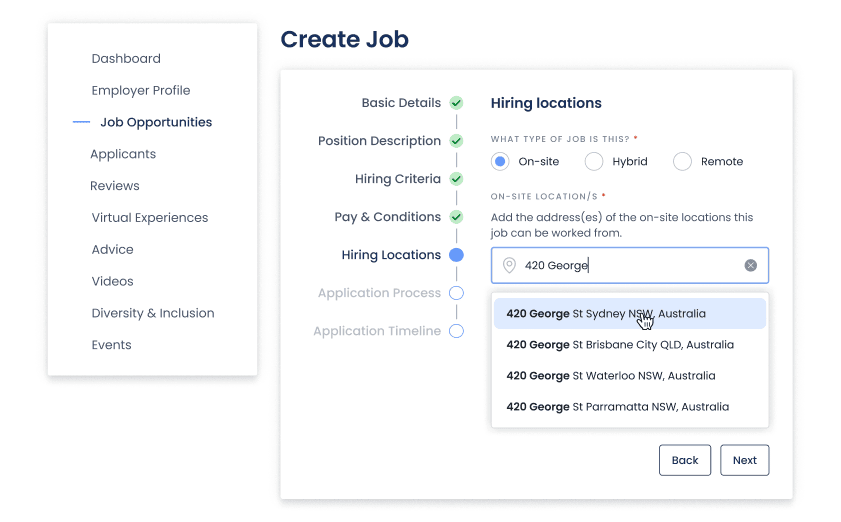
Autocomplete search: Students can now search for jobs anywhere in the world, simply by typing and using our autocomplete feature
Radius search: Students can set a radius around the location they have selected to make searches more effective
Work-type filtering: Students can now filter specifically for Remote, Hybrid, or On-site roles via a new dedicated filter
SEO boost:By collecting exact addresses, your roles will now rank better in Google for Jobs, which rewards listings with precise location data.
Inclusion in more search results: With more accurate location data and user defined search radius, your jobs may appear in more search result pages on Prosple and our partner sites.
Improved targeting: Students will start receiving job notifications based on more accurate location preferences in their profiles, ensuring your roles are seen by the right candidates in the right places.
And that’s it - you’re now up to speed on the new location experience at Prosple! 📍
As always, feel free to reach out to product-team@prosple.com with any questions or suggestions. We’re always looking for ways to make your hiring process even better.